terça-feira, 14 de abril de 2020

How To Change Facebook’s Default Theme To Any Color You Want

Change Facebook Theme Using Chrome Extension

How To Change Facebook's Default Theme To Any Color You Want

We are going to share an interesting trick on changing your Facebook default theme. You just need a Google Chrome extension to perform this trick. If you are among me who feels very fatigued with the look of Facebook's by default theme then this is a must-see post because you will find out the easiest trick to make your facebook more attractive than before.

Facebook is a social networking site which empowers people to connect with friends and people around. That's how Facebook is habitually introduced. However, Facebook is beyond the need of being introduced as almost everyone is on it.
   A couple of Days ago I was simply Surfing Google Chrome website and I somehow stumbled upon a Chrome Extension. Yes, a Chrome extension that will give your Facebook a Whole new look. I was apprehensive to try it, So I just installed it and checked my facebook. I was astonished to see my facebook homepage have all new look. I found it refreshing and decided to write steps on How to Change Facebook Themes using Chrome Extension.

How To Change Facebook's Default Theme To Any Color You Want

If You are among me who feels very fatigued with the look of Facebook's by default theme then this is a must-see post, Because you will find out the easiest trick to make your facebook more attractive than before. Simply follow the steps to know about it.

How to Change Facebook Theme Using Chrome Extension

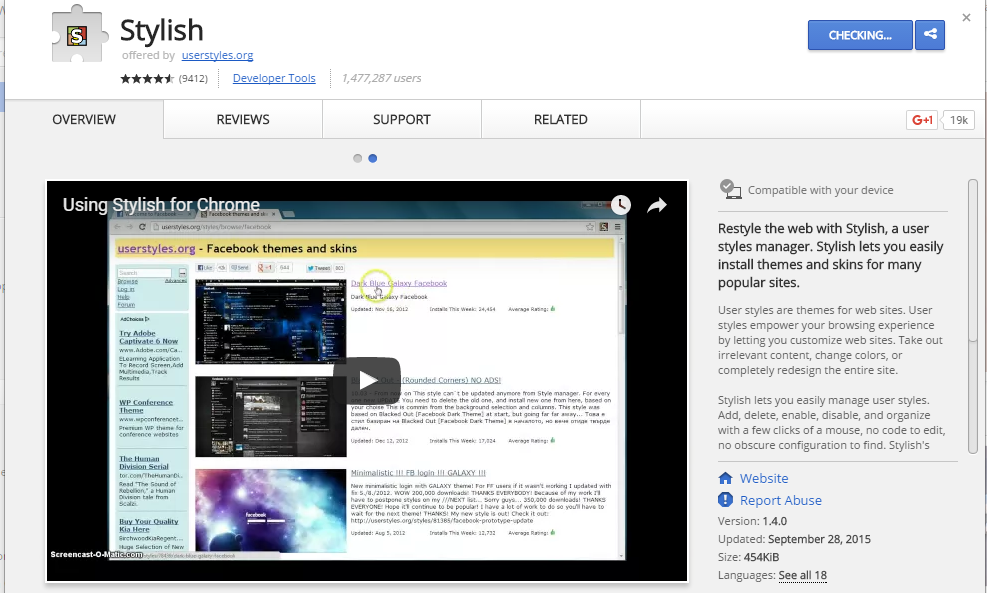
Step 1. Install Stylish for Chrome from the Chrome Web Store. It will take hardly a minute to get installed in your Chrome browser.
Change Facebook Theme Using Chrome Extension
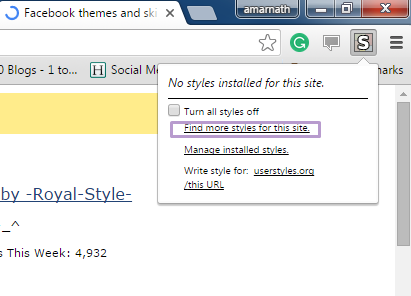
Step 2. Navigate to Facebook.com and click on the S button. Click on Find Styles for this Site to open a new tab with free themes to use for Facebook. Most of the themes are free and attractive too you can easily browse over the full website to discover your favorite theme.
Change Facebook Theme Using Chrome Extension
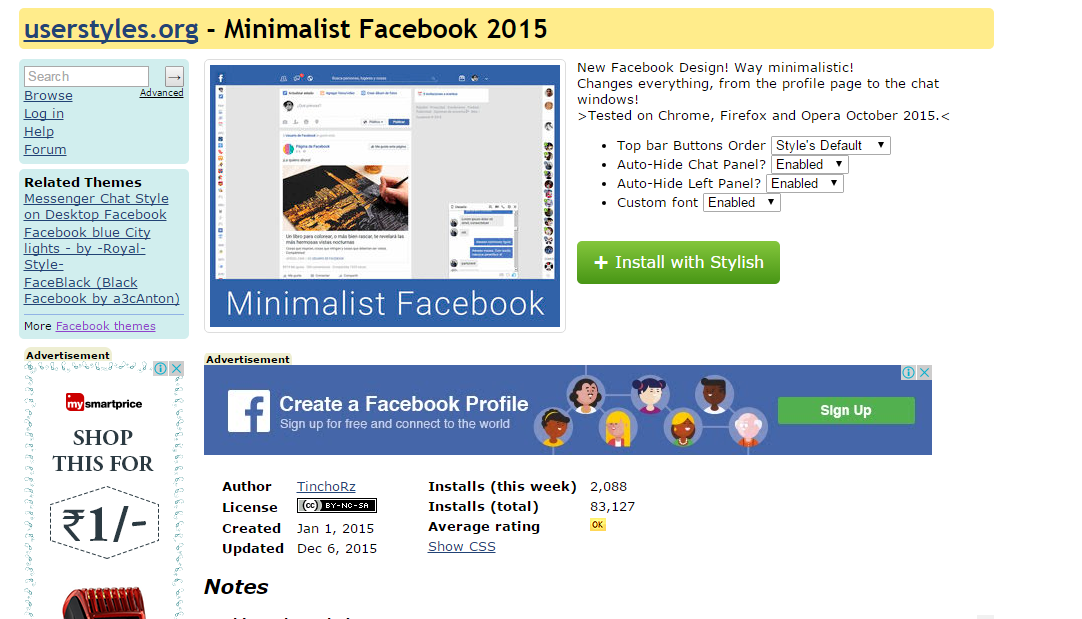
Step 3. Now You will be redirected towards https://userstyles.org Guess what! This site contains huge numbers of Facebook themes, One thing is for sure that you will be confused in-between what to select and which one to skip. Select any them and click on it. Now you will be given a full preview of your selected theme.
Change Facebook Theme Using Chrome Extension
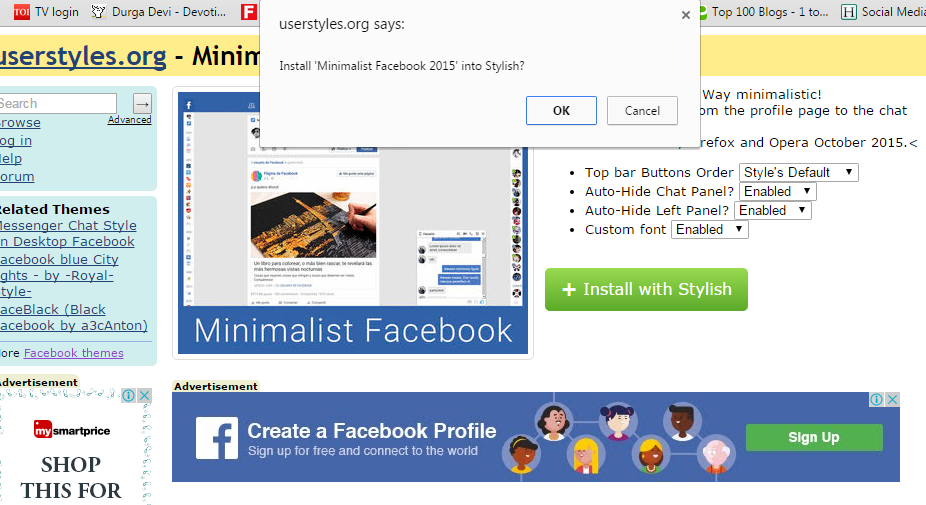
Step 4. If everything is fine in the previewed theme, click on Install with Stylish button at the top right corner of the page. It will take few seconds or minutes depends on your theme size to be installed in Stylish Extension, once installed you will be notified with a success message.
Change Facebook Theme Using Chrome Extension
Step 5. Now whenever you open Facebook, it will show the theme that you have installed with Stylish instead of the boring old blue theme.
Change Facebook Theme Using Chrome Extension
Related word

Nemesis: A Packet Injection Utility


"Nemesis is a command-line network packet injection utility for UNIX-like and Windows systems. You might think of it as an EZ-bake packet oven or a manually controlled IP stack. With Nemesis, it is possible to generate and transmit packets from the command line or from within a shell script. Nemesis attacks directed through fragrouter could be a most powerful combination for the system auditor to find security problems that could then be reported to the vendor(s)." read more...

Website: http://www.packetfactory.net/projects/nemesis

More articles


Why (I Believe) WADA Was Not Hacked By The Russians

Disclaimer: This is my personal opinion. I am not an expert in attribution. But as it turns out, not many people in the world are good at attribution. I know this post lacks real evidence and is mostly based on speculation.


Let's start with the main facts we know about the WADA hack, in chronological order:


1. Some point in time (August - September 2016), the WADA database has been hacked and exfiltrated
2. August 15th, "WADA has alerted their stakeholders that email phishing scams are being reported in connection with WADA and therefore asks its recipients to be careful"  https://m.paralympic.org/news/wada-warns-stakeholders-phishing-scams
3. September 1st, the fancybear.net domain has been registered
   Domain Name: FANCYBEAR.NET
...
Updated Date: 18-sep-2016
Creation Date: 01-sep-2016
4. The content of the WADA hack has been published on the website
5. The @FancyBears and @FancyBearsHT Twitter accounts have been created and started to tweet on 12th September, reaching out to journalists
6. 12th September, Western media started headlines "Russia hacked WADA"
7. The leaked documents have been altered, states WADA https://www.wada-ama.org/en/media/news/2016-10/cyber-security-update-wadas-incident-response


The Threatconnect analysis

The only technical analysis on why Russia was behind the hack, can be read here: https://www.threatconnect.com/blog/fancy-bear-anti-doping-agency-phishing/

After reading this, I was able to collect the following main points:

  1. It is Russia because Russian APT groups are capable of phishing
  2. It is Russia because the phishing site "wada-awa[.]org was registered and uses a name server from ITitch[.]com, a domain registrar that FANCY BEAR actors recently used"
  3. It is Russia because "Wada-arna[.]org and tas-cass[.]org were registered through and use name servers from Domains4bitcoins[.]com, a registrar that has also been associated with FANCY BEAR activity."
  4. It is Russia, because "The registration of these domains on August 3rd and 8th, 2016 are consistent with the timeline in which the WADA recommended banning all Russian athletes from the Olympic and Paralympic games."
  5. It is Russia, because "The use of 1&1 mail.com webmail addresses to register domains matches a TTP we previously identified for FANCY BEAR actors."

There is an interesting side-track in the article, the case of the @anpoland account. Let me deal with this at the end of this post.

My problem with the above points is that all five flag was publicly accessible to anyone as TTP's for Fancy Bear. And meanwhile, all five is weak evidence. Any script kittie in the world is capable of both hacking WADA and planting these false-flags.

A stronger than these weak pieces of evidence would be:

  • Malware sharing same code attributed to Fancy Bear (where the code is not publicly available or circulating on hackforums)
  • Private servers sharing the IP address with previous attacks attributed to Fancy Bear (where the server is not a hacked server or a proxy used by multiple parties)
  • E-mail addresses used to register the domain attributed to Fancy Bear
  • Many other things
For me, it is quite strange that after such great analysis on Guccifer 2.0, the Threatconnect guys came up with this low-value post. 


The fancybear website

It is quite unfortunate that the analysis was not updated after the documents have been leaked. But let's just have a look at the fancybear . net website, shall we?

Now the question is, if you are a Russian state-sponsored hacker group, and you are already accused of the hack itself, do you create a website with tons of bears on the website, and do you choose the same name (Fancy Bear) for your "Hack team" that is already used by Crowdstrike to refer to a Russian state-sponsored hacker group? Well, for me, it makes no sense. Now I can hear people screaming: "The Russians changed tactics to confuse us". Again, it makes no sense to change tactics on this, while keeping tactics on the "evidence" found by Threatconnect.

It makes sense that a Russian state-sponsored group creates a fake persona, names it Guccifer 2.0, pretends Guccifer 2.0 is from Romania, but in the end it turns out Guccifer 2.0 isn't a native Romanian speaker. That really makes sense.

What happens when someone creates this fancybear website for leaking the docs, and from the Twitter account reaches out to the media? Journalists check the website, they see it was done by Fancy Bear, they Bing Google this name, and clearly see it is a Russian state-sponsored hacker group. Some journalists also found the Threatconnect report, which seems very convincing for the first read. I mean, it is a work of experts, right? So you can write in the headlines that the hack was done by the Russians.

Just imagine an expert in the USA or Canada writing in report for WADA:
"the hack was done by non-Russian, but state-sponsored actors, who planted a lot of false-flags to accuse the Russians and to destroy confidence in past and future leaks". Well, I am sure this is not a popular opinion, and whoever tries this, risks his career. Experts are human, subject to all kinds of bias.

The Guardian

The only other source I was able to find is from The Guardian, where not just one side (it was Russia) was represented in the article. It is quite unfortunate that both experts are from Russia - so people from USA will call them being not objective on the matter. But the fact that they are Russian experts does not mean they are not true ...

https://www.theguardian.com/sport/2016/sep/15/fancy-bears-hackers--russia-wada-tues-leaks

Sergei Nikitin:
"We don't have this in the case of the DNC and Wada hacks, so it's not clear on what basis conclusions are being drawn that Russian hackers or special services were involved. It's done on the basis of the website design, which is absurd," he said, referring to the depiction of symbolically Russian animals, brown and white bears, on the "Fancy Bears' Hack Team" website.

I don't agree with the DNC part, but this is not the topic of conversation here.

Alexander Baranov:
"the hackers were most likely amateurs who published a "semi-finished product" rather than truly compromising information. "They could have done this more harshly and suddenly," he said. "If it was [state-sponsored] hackers, they would have dug deeper. Since it's enthusiasts, amateurs, they got what they got and went public with it.""

The @anpoland side-track

First please check the tas-cas.org hack https://www.youtube.com/watch?v=day5Aq0bHsA  , I will be here when you finished it. This is a website for "Court of Arbitration for Sport's", and referring to the Threatconnect post, "CAS is the highest international tribunal that was established to settle disputes related to sport through arbitration. Starting in 2016, an anti-doping division of CAS began judging doping cases at the Olympic Games, replacing the IOC disciplinary commission." Now you can see why this attack is also discussed here.


  • My bet is that this machine was set-up for these @anpoland videos only. Whether google.ru is a false flag or it is real, hard to decide. It is interesting to see that there is no google search done via google.ru, it is used only once. 
  • The creator of the video can't double click. Is it because he has a malfunctioning mouse? Is it because he uses a virtualization console, which is near-perfect OPSEC to hide your real identity? My personal experience is that using virtualization consoles remotely (e.g. RDP) has very similar effects to what we can see on the video. 
  • The timeline of the Twitter account is quite strange, registered in 2010
  • I agree with the Threatconnect analysis that this @anpoland account is probably a faketivist, and not an activist. But who is behind it, remains a mystery. 
  • Either the "activist" is using a whonix-like setup for remaining anonymous, or a TOR router (something like this), or does not care about privacy at all. Looking at the response times (SQLmap, web browser), I doubt this "activist" is behind anything related to TOR. Which makes no sense for an activist, who publishes his hack on Youtube. People are stupid for sure, but this does not add up. It makes sense that this was a server (paid by bitcoins or stolen credit cards or whatever) rather than a home computer.
For me, this whole @anpoland thing makes no sense, and I think it is just loosely connected to the WADA hack. 

The mysterious Korean characters in the HTML source

There is another interesting flag in the whole story, which actually makes no sense. When the website was published, there were Korean characters in HTML comments. 


When someone pointed this out on Twitter, these Korean HTML comments disappeared:
These HTML comments look like generated HTML comments, from a WYSIWYG editor, which is using the Korean language. Let me know if you can identify the editor.

The Russians are denying it

Well, what choice they have? It does not matter if they did this or not, they will deny it. And they can't deny this differently. Just imagine a spokesperson: "Previously we have falsely denied the DCC and DNC hacks, but this time please believe us, this wasn't Russia." Sounds plausible ...

Attribution

Let me sum up what we know:

It makes sense that the WADA hack was done by Russia, because:

  1. Russia being almost banned from the Olympics due to doping scandal, it made sense to discredit WADA and US Olympians
  2. There are multiple(weak) pieces of evidence which point to Russia
It makes sense that the WADA hack was not done by  Russia, because: 
  1. By instantly attributing the hack to the Russians, the story was more about to discredit Russia than discrediting WADA or US Olympians.
  2. In reality, there was no gain for Russia for disclosing the documents. Nothing happened, nothing changed, no discredit for WADA. Not a single case turned out to be illegal or unethical.
  3. Altering the leaked documents makes no sense if it was Russia (see update at the end). Altering the leaked documents makes a lot of sense if it was not Russia. Because from now on, people can always state "these leaks cannot be trusted, so it is not true what is written there". It is quite cozy for any US organization, who has been hacked or will be hacked. If you are interested in the "Russians forging leaked documents" debate, I highly recommend to start with this The Intercept article
  4. If the Korean characters were false flags planted by the Russians, why would they remove it? If it had been Russian characters, I would understand removing it.
  5. All evidence against Russia is weak, can be easily forged by even any script kittie.

I don't like guessing, but here is my guess. This WADA hack was an operation of a (non-professional) hackers-for-hire service, paid by an enemy of Russia. The goal was to hack WADA, leak the documents, modify some contents in the documents, and blame it all on the Russians ...

Questions and answers

  • Was Russia capable of doing this WADA hack? Yes.
  • Was Russia hacking WADA? Maybe yes, maybe not.
  • Was this leak done by a Russian state-sponsored hacker group? I highly doubt that.
  • Is it possible to buy an attribution-dice where all six-side is Russia? No, it is sold-out. 

To quote Patrick Gray: "Russia is the new China, and the Russians ate my homework."©

Let me know what you think about this, and please comment. 

More info

  1. Pentest Tools Port Scanner
  2. Hacking Tools Github
  3. Pentest Tools Windows
  4. Pentest Recon Tools
  5. Hacking Tools For Beginners
  6. Hack Tools For Ubuntu
  7. Hacking Tools For Kali Linux
  8. Pentest Reporting Tools
  9. Hacking App
  10. Pentest Tools For Mac
  11. Hacking Tools Windows
  12. Pentest Tools Nmap
  13. Usb Pentest Tools
  14. Growth Hacker Tools
  15. Hacking Tools Windows 10
  16. Pentest Box Tools Download
  17. Physical Pentest Tools
  18. Hacking Tools Kit
  19. What Is Hacking Tools
  20. Kik Hack Tools
  21. What Is Hacking Tools
  22. How To Hack
  23. Pentest Automation Tools
  24. Hacker Tools Online
  25. Pentest Tools Online

ASIS CTF Quals 2015 - Sawthis Writeup - Srand Remote Prediction


The remote service ask for a name, if you send more than 64 bytes, a memory leak happens.
The buffer next to the name's is the first random value used to init the srand()


If we get this value, and set our local srand([leaked] ^ [luckyNumber]) we will be able to predict the following randoms and win the game, but we have to see few details more ;)

The function used to read the input until the byte \n appears, but also up to 64 bytes, if we trigger this second condition there is not 0x00 and the print shows the random buffer :)

The nickname buffer:


The seed buffer:


So here it is clear, but let's see that the random values are computed with several gpu instructions which are decompiled incorrectly:


We tried to predict the random and aply the gpu divisions without luck :(


There was a missing detail in this predcitor, but there are always other creative ways to do the things.
We use the local software as a predictor, we inject the leaked seed on the local binary of the remote server and got a perfect syncronization, predicting the remote random values:


The process is a bit ugly becouse we combined automated process of leak exctraction and socket interactive mode, with the manual gdb macro.


The macro:


Related news

Save Your Cloud: Gain Root Access To VMs In OpenNebula 4.6.1


In this post, we show a proof-of-concept attack that gives us root access to a victim's VM in the Cloud Management Platform OpenNebula, which means that we can read and write all its data, install software, etc. The interesting thing about the attack is, that it allows an attacker to bridge the gap between the cloud's high-level web interface and the low-level shell-access to a virtual machine.

Like the latest blogpost of this series, this is a post about an old CSRF- and XSS-vulnerability that dates back to 2014. However, the interesting part is not the vulnerability itself but rather the exploit that we were able to develop for it.

An attacker needs the following information for a successful attack.
  • ID of the VM to attack
    OpenNebula's VM ID is a simple global integer that is increased whenever a VM is instantiated. The attacker may simply guess the ID. Once the attacker can execute JavaScript code in the scope of Sunstone, it is possible to use OpenNebula's API and data structures to retrieve this ID based on the name of the desired VM or its IP address.
  • Operating system & bootloader
    There are various ways to get to know a VMs OS, apart from simply guessing. For example, if the VM runs a publicly accessible web server, the OS of the VM could be leaked in the HTTP-Header Server (see RFC 2616). Another option would be to check the images or the template the VM was created from. Usually, the name and description of an image contains information about the installed OS, especially if the image was imported from a marketplace.
    Since most operating systems are shipped with a default bootloader, making a correct guess about a VMs bootloader is feasible. Even if this is not possible, other approaches can be used (see below).
  • Keyboard layout of the VM's operating system
    As with the VMs bootloader, making an educated guess about a VM's keyboard layout is not difficult. For example, it is highly likely that VMs in a company's cloud will use the keyboard layout of the country the company is located in.

Overview of the Attack

The key idea of this attack is that neither Sunstone nor noVNC check whether keyboard related events were caused by human input or if they were generated by a script. This can be exploited so that gaining root access to a VM in OpenNebula requires five steps:
  1. Using CSRF, a persistent XSS payload is deployed.
  2. The XSS payload controls Sunstone's API.
  3. The noVNC window of the VM to attack is loaded into an iFrame.
  4. The VM is restarted using Sunstone's API.
  5. Keystroke-events are simulated in the iFrame to let the bootloader open a root shell.

Figure 1: OpenNebula's Sunstone Interface displaying the terminal of a VM in a noVNC window.

The following sections give detailed information about each step.

Executing Remote Code in Sunstone

In Sunstone, every account can choose a display language. This choice is stored as an account parameter (e.g. for English LANG=en_US). In Sunstone, the value of the LANG parameter is used to construct a <script> tag that loads the corresponding localization script. For English, this creates the following tag:
<script src="locale/en_US/en_US.js?v=4.6.1" type="text/javascript"></script>
Setting the LANG parameter to a different string directly manipulates the path in the script tag. This poses an XSS vulnerability. By setting the LANG parameter to LANG="onerror=alert(1)//, the resulting script tag looks as follows:
<script src="locale/"onerror=alert(1)///"onerror=alert(1)//.js?v=4.6.1" type="text/javascript"></script>
For the web browser, this is a command to fetch the script locale/ from the server. However, this URL points to a folder, not a script. Therefore, what the server returns is no JavaScript. For the browser, this is an error, so the browser executes the JavaScript in the onerror statement: alert(1). The rest of the line (including the second alert(1)) is treated as comment due to the forward slashes.

When a user updates the language setting, the browser sends an XMLHttpRequest of the form
{ "action" : { "perform" : "update", "params" : { "template_raw" : "LANG=\"en_US\"" } }}
to the server (The original request contains more parameters. Since these parameters are irrelevant for the technique, we omitted them for readability.). Forging a request to Sunstone from some other web page via the victim's browser requires a trick since one cannot use an XMLHttpRequest due to restrictions enforced by the browser's Same-Origin-Policy. Nevertheless, using a self-submitting HTML form, the attacker can let the victim's browser issue a POST request that is similar enough to an XMLHttpRequest so that the server accepts it.

An HTML form field like
<input name='deliver' value='attacker' />
is translated to a request in the form of deliver=attacker. To create a request changing the user's language setting to en_US, the HTML form has to look like
<input name='{"action":{"perform":"update","params":{"template_raw":"LANG' value='\"en_US\""}}}' />
Notice that the equals sign in LANG=\"en_US\" is inserted by the browser because of the name=value format.

Figure 2: OpenNebula's Sunstone Interface displaying a user's attributes with the malicious payload in the LANG attribute.

Using this trick, the attacker sets the LANG parameter for the victim's account to "onerror=[remote code]//, where [remote code] is the attacker's exploit code. The attacker can either insert the complete exploit code into this parameter (there is no length limitation) or include code from a server under the attacker's control. Once the user reloads Sunstone, the server delivers HTML code to the client that executes the attacker's exploit.

Prepare Attack on VM

Due to the overwritten language parameter, the victim's browser does not load the localization script that is required for Sunstone to work. Therefore, the attacker achieved code execution, but Sunstone breaks and does not work anymore. For this reason, the attacker needs to set the language back to a working value (e.g. en_US) and reload the page in an iFrame. This way Sunstone is working again in the iFrame, but the attacker can control the iFrame from the outside. In addition, the attack code needs to disable a watchdog timer outside the iFrame that checks whether Sunstone is correctly initialized.

From this point on, the attacker can use the Sunstone API with the privileges of the victim. This way, the attacker can gather all required information like OpenNebula's internal VM ID and the keyboard layout of the VM's operating system from Sunstone's data-structures based on the name or the IP address of the desired VM.

Compromising a VM

Using the Sunstone API the attacker can issue a command to open a VNC connection. However, this command calls window.open, which opens a new browser window that the attacker cannot control. To circumvent this restriction, the attacker can overwrite window.open with a function that creates an iFrame under the attacker's control.

Once the noVNC-iFrame has loaded, the attacker can send keystrokes to the VM using the dispatchEvent function. Keystrokes on character keys can be simulated using keypress events. Keystrokes on special keys (Enter, Tab, etc.) have to be simulated using pairs of keydown and keyup events since noVNC filters keypress events on special keys.

Getting Root Access to VM

To get root access to a VM the attacker can reboot a victim's VM using the Sunstone API and then control the VM's bootloader by interrupting it with keystrokes. Once the attacker can inject commands into the bootloader, it is possible to use recovery options or the single user mode of Linux based operating systems to get a shell with root privileges. The hardest part with this attack is to get the timing right. Usually, one only has a few seconds to interrupt a bootloader. However, if the attacker uses the hard reboot feature, which instantly resets the VM without shutting it down gracefully, the time between the reboot command and the interrupting keystroke can be roughly estimated.

Even if the bootloader is unknown, it is possible to use a try-and-error approach. Since the variety of bootloaders is small, one can try for one particular bootloader and reset the machine if the attack was unsuccessful. Alternatively, one can capture a screenshot of the noVNC canvas of the VM a few seconds after resetting the VM and determine the bootloader.

A video of the attack can be seen here. The browser on the right hand side shows the victim's actions. A second browser on the left hand side shows what is happening in OpenNebula. The console window on the bottom right shows that there is no user-made keyboard input while the attack is happening.